
DIY Wallpaper & Collage Maker
Aesthetic Themes AppsPersonalization
4.92.00 Reviews
- Version
- 1.0.1
- Installs
- 100.00K
- Age Rating
- Everyone
Screenshots
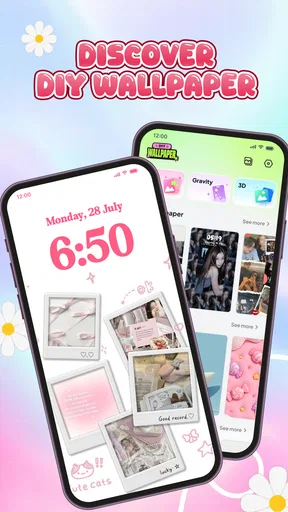
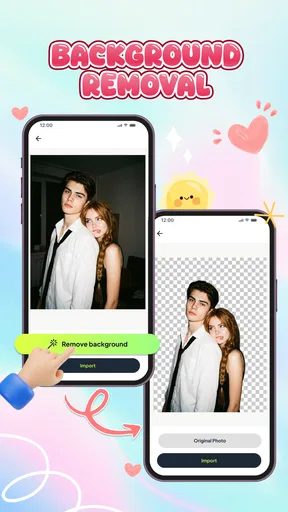
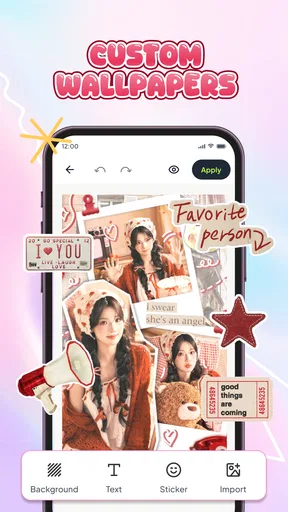
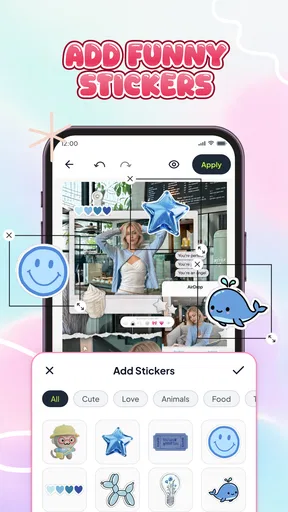
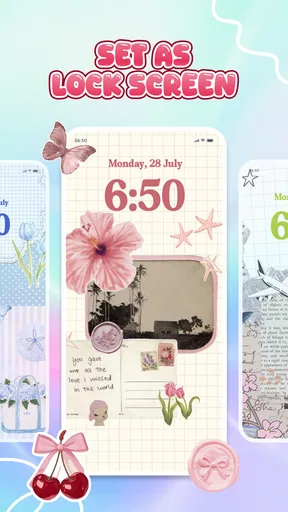
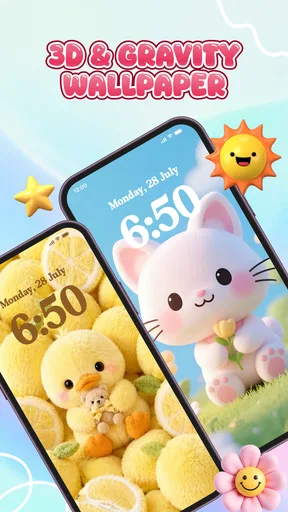
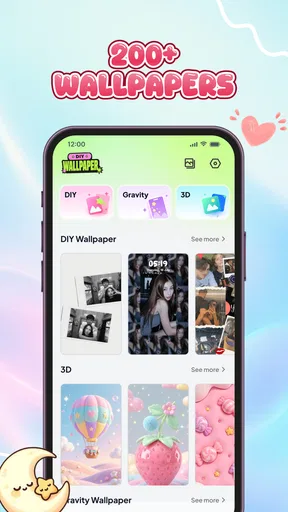
Our Review of DIY Wallpaper & Collage Maker
 Analysis by Appyee
DIY Wallpaper & Collage Maker is the kind of personalization app I would open when a regular photo no longer feels special enough for my phone screen. Its main idea is simple: turn several photos into a wallpaper and add movement through 3D and Gravity effects. In practice, that changes the role of a wallpaper from a single static image into a small visual arrangement that reacts more naturally to the device.
I reviewed it as a free Android personalization app from Aesthetic Themes Apps. It is aimed at everyday users rather than professional designers, and its Everyone age rating makes that audience clear. The store presents it as “DIY Wallpaper,” but I found the more useful way to think about it is as a quick collage tool for people who want a personal background without opening a full photo-editing suite.
Why the collage effect matters more than another wallpaper pack
The strongest capability here is not simply choosing a picture. It is combining photos into one background and then giving that composition a sense of depth or motion. That distinction matters because a single favorite photograph can look flat once it is cropped to fit a tall phone display. A collage gives me more room to tell a small story: a person, a place, a pet, or several moments can share the same screen.
The 3D effect can make separate images feel layered instead of placed side by side like a basic grid. The Gravity effect is more playful, because it suggests that the composition responds to movement rather than remaining completely fixed. I would not treat this as a replacement for a full animated-wallpaper system, but it does make the finished result feel more alive than an ordinary image.
That is the real benefit: the wallpaper becomes a personal visual layout instead of a cropped snapshot. If you change backgrounds often, the difference may be enough to keep the app interesting. If you prefer one clean photograph with no visual activity, the extra effects may feel unnecessary.
The app has a 4.9 average from around 560 ratings, and it has passed 100K installs. Those figures suggest that the basic concept is easy for many people to appreciate, although they do not tell me whether every phone handles the effects in exactly the same way. I would judge it by the result on your own device, especially if you are sensitive to motion or prefer a very restrained home screen.
Turning personal photos into a usable screen background
My preferred way to use a collage wallpaper is to start with a small group of photos that already belong together. For example, I might choose one wide landscape, one close-up detail, and one portrait from the same day. The landscape establishes the mood, the detail adds texture, and the portrait gives the arrangement a clear focal point.
This approach works better than selecting many unrelated pictures just because they are attractive. A phone screen is viewed repeatedly in short moments, so a crowded collage can become tiring. I would begin with the few images that matter most, then check whether the result remains readable behind icons and widgets. The 3D treatment is most convincing when the chosen photos have distinct subjects or backgrounds that can visually separate.
A useful trick is to prepare the photos mentally before creating the wallpaper. Very bright images can compete with app labels, while faces placed near the edge may be lost when the screen crops differently. The app’s appeal is speed, but spending a minute choosing balanced images can make the final background look much more deliberate.
I also see a practical difference between a lock screen and a home screen. A more expressive collage can work well on the lock screen, where there are fewer icons covering it. On the home screen, I would favor a quieter arrangement with one darker or less detailed area behind the app grid. This is not a separate feature claim about the app; it is simply the best way to use its central collage idea without sacrificing readability.
What the 3D and Gravity effects change in everyday use
A static collage depends entirely on composition. The 3D effect adds separation, so the eye can read the images as parts of a scene rather than a flat collection. That is especially useful with travel photos, family pictures, or artwork where the subject benefits from a little visual distance from the background.
The Gravity effect changes the mood more noticeably. It suits playful images, colorful designs, and casual photo collections. I would use it for a vacation set or a group of pet photos, but probably not for a minimalist work phone. Motion can make the device feel more personal, yet it can also draw attention every time I unlock the screen.
One trade-off is that effects are most enjoyable when they support the photos instead of competing with them. If every image has strong lines, busy colors, and a different focal point, movement may make the composition feel restless. A calmer set of pictures gives the effect room to work. This is one of the app’s less obvious lessons: the quality of the source photos matters almost as much as the effect itself.
I would also test the finished wallpaper for a full day before deciding whether it is a keeper. A background can look exciting during setup and become distracting after repeated use. The app makes experimentation appealing because it is free, but the best result may be the one with the lightest touch rather than the most dramatic treatment.
A realistic use case: making a weekend memory fit one phone
Imagine coming home from a weekend trip with photos of a street, a meal, a friend, and a view. Usually I would choose one image for the phone and leave the others buried in the gallery. With this app, I can turn those moments into one compact background. The street photo can provide the main atmosphere, the view can add depth, and the smaller images can preserve details that would otherwise never appear on the screen.
For that situation, I would avoid treating the collage as a scrapbook page packed with equal-sized pictures. I would choose one dominant image and let the others act as supporting memories. The 3D effect can reinforce that hierarchy, while Gravity can add a little movement when I tilt or handle the phone. The result is more personal than downloading a generic travel wallpaper, but faster than building a polished design in a desktop editor.
This workflow also works for a birthday, a new pet, a child’s artwork, or a seasonal change in the home screen. The app is particularly appealing when the images already have emotional value and I want to see several of them without opening a separate gallery. It gives a temporary event its own visual identity, then lets me replace it when the moment has passed.
For a work device, I would take a different approach. I might use two or three muted images, keep the focal point away from the icon area, and skip the most energetic effect. That way, the wallpaper still feels personal without making the screen harder to scan during a busy day.
Where it fits beside ordinary wallpaper alternatives
The usual alternative is a single photo from the camera roll. That option is faster and usually cleaner, but it forces me to choose one memory. DIY Wallpaper & Collage Maker is better when several pictures deserve attention or when a single image loses impact after cropping.
Another alternative is a ready-made wallpaper collection. Downloaded designs are often more polished from the start, especially if I want abstract art, landscapes, or a consistent style. They are less personal, though, and they do not turn my own photos into a moving collage. This app wins when ownership and customization matter more than a professionally illustrated look.
Full photo editors offer finer control over spacing, typography, color correction, and layers. They are the better choice for someone designing a branded background, preparing images for publication, or demanding exact placement. The advantage here is the narrower workflow: I can focus on making a wallpaper rather than learning a large set of editing tools.
There is also a difference from a completely animated background. A full motion wallpaper may offer richer animation, but it can be excessive for someone who only wants a little depth and movement. This app’s appeal is the middle ground between a flat image and an elaborate animated scene. That balance is also its limitation: users seeking detailed animation controls should look elsewhere.
The friction points I would consider before installing
The first limitation is creative control. A quick collage maker is convenient precisely because it does not ask me to manage every design decision. If I want exact margins, custom text, detailed color adjustments, or a carefully engineered layout, the streamlined approach may feel restrictive. I would not choose it for a design project that needs pixel-level consistency.
The effects can also divide users. Some people enjoy a wallpaper that responds with energy; others want the home screen to disappear behind their apps. If motion bothers you, or if you prefer a calm background for reading and work, the Gravity effect may not add enough value to justify changing your usual setup.
Photo selection is another potential source of frustration. Images with very different lighting, orientations, or subjects can make a collage look accidental. The app can help assemble the material, but it cannot replace good judgment about which photos belong together. I would keep a small themed folder in the gallery before starting instead of choosing images randomly from the entire camera roll.
Compatibility is worth approaching sensibly. The current version is 1.0.1 and it supports Android 9 or newer, so anyone using an older Android release would not be in its intended range. On supported phones, I would still check the result at different angles and with icons visible. A wallpaper that looks excellent in the editor may need a different photo order or a quieter focal area once it becomes the actual home screen.
Because the app is free, it is easy to try without making a purchase decision. That lowers the risk, but it also means I would evaluate it by how often I actually use the finished wallpapers. If I only want one permanent background and never change it, a normal photo may be the simpler answer.
Small workflow choices that improve the final result
I found three habits especially useful. First, I would choose photos with complementary shapes rather than several nearly identical portraits. A wide scene, a close detail, and a subject with clear edges give the 3D treatment more visual material to work with.
Second, I would design around the phone’s icon placement. Keep the busiest image away from the area where labels appear, and leave enough visual calm for the clock or widgets. This makes the wallpaper feel better during ordinary use, not just during the preview stage.
Third, I would create different versions for different moods instead of trying to make one collage do everything. A lively Gravity arrangement can suit weekends, while a simpler 3D composition may work better during a workweek. Treating the wallpaper as something replaceable encourages experimentation without requiring a permanent change to the phone’s identity.
A fourth useful habit is to compare the effect with the same collage in a static form. If the arrangement already looks strong without motion, the effect is adding polish. If it only looks interesting because everything is moving, I would reconsider the photo choices. That test helps separate a good composition from a distracting one.
Who will get the most from this personalization app
I think it is best for people who regularly take photos and want those pictures to remain visible. It is also a good fit for anyone who finds wallpaper packs too impersonal but does not want the complexity of a full editor. Families, travelers, pet owners, and users who enjoy refreshing their phone’s appearance can all find a clear reason to try it.
It is less suitable for someone who wants professional graphic-design control, a highly animated background, or a completely distraction-free screen. Those users would probably be happier with a dedicated design tool, a curated wallpaper service, or a single carefully chosen photograph. The app’s strength is not unlimited customization; it is the quick transformation of personal images into a more lively background.
The Everyone rating also makes it approachable for a broad audience, including people who are simply curious about changing their screen for the first time. I would recommend starting with a small set of favorite photos and using the app as a visual experiment rather than expecting a complete design studio.
My recommendation after using the core idea
DIY Wallpaper & Collage Maker succeeds because it focuses on one appealing result: several personal photos can become a wallpaper with added depth and movement. The 3D and Gravity effects give the collage more character than a standard camera-roll image, while the free format makes trying different combinations easy.
My recommendation is strongest for casual personalization. Use it when you want a weekend memory, a family set, or a playful collection of images on your screen. Start with fewer photos, keep the icon area readable, and test the effect for a day before deciding whether it is comfortable. If you need precise design controls or dislike motion, choose a simpler alternative instead.
For Android users on version 9 or later, the app is an accessible way to make a phone feel more like their own. Aesthetic Themes Apps keeps the concept focused, and version 1.0.1 is most convincing when treated as a fast creative tool rather than an all-purpose editor. I would install it when I have a group of photos that deserves more attention than a single wallpaper can provide.
Verdict
Strengths of DIY Wallpaper & Collage Maker
- Offers many ready-made templates for quick wallpaper creation.
- Supports custom photo collages with flexible layouts and spacing.
- Useful editing tools help adjust colors, filters, and image positioning.
- Lets users create personalized backgrounds for phones and tablets.
- Simple interface makes basic designs accessible to beginners.
Limitations of DIY Wallpaper & Collage Maker
- Some templates and design elements may require a premium subscription.
- Export quality can vary depending on the original photos used.
- Frequent ads may interrupt editing for users on the free version.
- Advanced typography and layout controls may feel somewhat limited.
- Large collage projects can use considerable device storage space.
Other Releases by Aesthetic Themes Apps
View All
Call Screen & Ringtones Music
Personalization4.4
Similar Picks in This Category
View All
Microsoft SwiftKey AI Keyboard
SwiftKey4.3

Wallpapers
Google LLC4.1

Zedge™ Wallpapers & Ringtones
Zedge4.7

Yandex Browser with Alice AI
Direct Cursus Computer Systems Trading LLC4.3

Ringtone Maker:create ringtone
Big Bang Inc.4.7

Fonts Keyboard
Fonts Keyboard3.9
Frequently Asked Questions
What is DIY Wallpaper & Collage Maker used for?
DIY Wallpaper & Collage Maker is a creative design app for making personalized wallpapers, phone backgrounds, photo collages, and decorative images. After opening the editor, you can combine several pictures, resize and reposition them, add text, apply filters, and use stickers or other design elements. It is useful for creating custom lock screens, home screens, social media graphics, and simple photo projects without needing professional editing experience.
Does DIY Wallpaper & Collage Maker include templates, stickers, and editing tools?
Yes, the app is designed around ready-made creative tools that make wallpaper and collage creation easier. Depending on the version and device, you may find templates, backgrounds, frames, stickers, fonts, filters, and adjustment options. You can usually modify the layout by moving, rotating, cropping, or resizing photos. Some advanced designs or premium elements may be restricted, so the available selection can vary between free and paid access.
Can I use my own photos to create a wallpaper or collage?
Yes, one of the main advantages of DIY Wallpaper & Collage Maker is the ability to import images from your device and turn them into a personalized design. You can select favorite travel photos, family pictures, pets, artwork, or screenshots, then arrange them in a collage. Before saving, check the crop and preview carefully so important parts of your images are not hidden by frames, text, or screen icons.
Does the app save wallpapers in a suitable quality for Android and iPhone screens?
The app can generally export completed designs for use as wallpapers, but the final appearance depends on the selected canvas size, your device resolution, and the quality of the original photos. For the sharpest result, choose a layout that matches your phone’s screen ratio and use high-resolution images. A design may need to be cropped slightly when applied because Android and iOS devices use different display sizes and wallpaper positioning.
Is DIY Wallpaper & Collage Maker free to download and use?
The application may be available as a free download, but free access does not necessarily include every feature. Many apps in this category support basic editing while placing premium templates, stickers, fonts, filters, or an ad-free experience behind optional purchases or a subscription. Before downloading or starting a trial, review the store listing and in-app pricing carefully, especially the renewal terms for any recurring subscription.
